See it work
A clean copy, before you even blink.
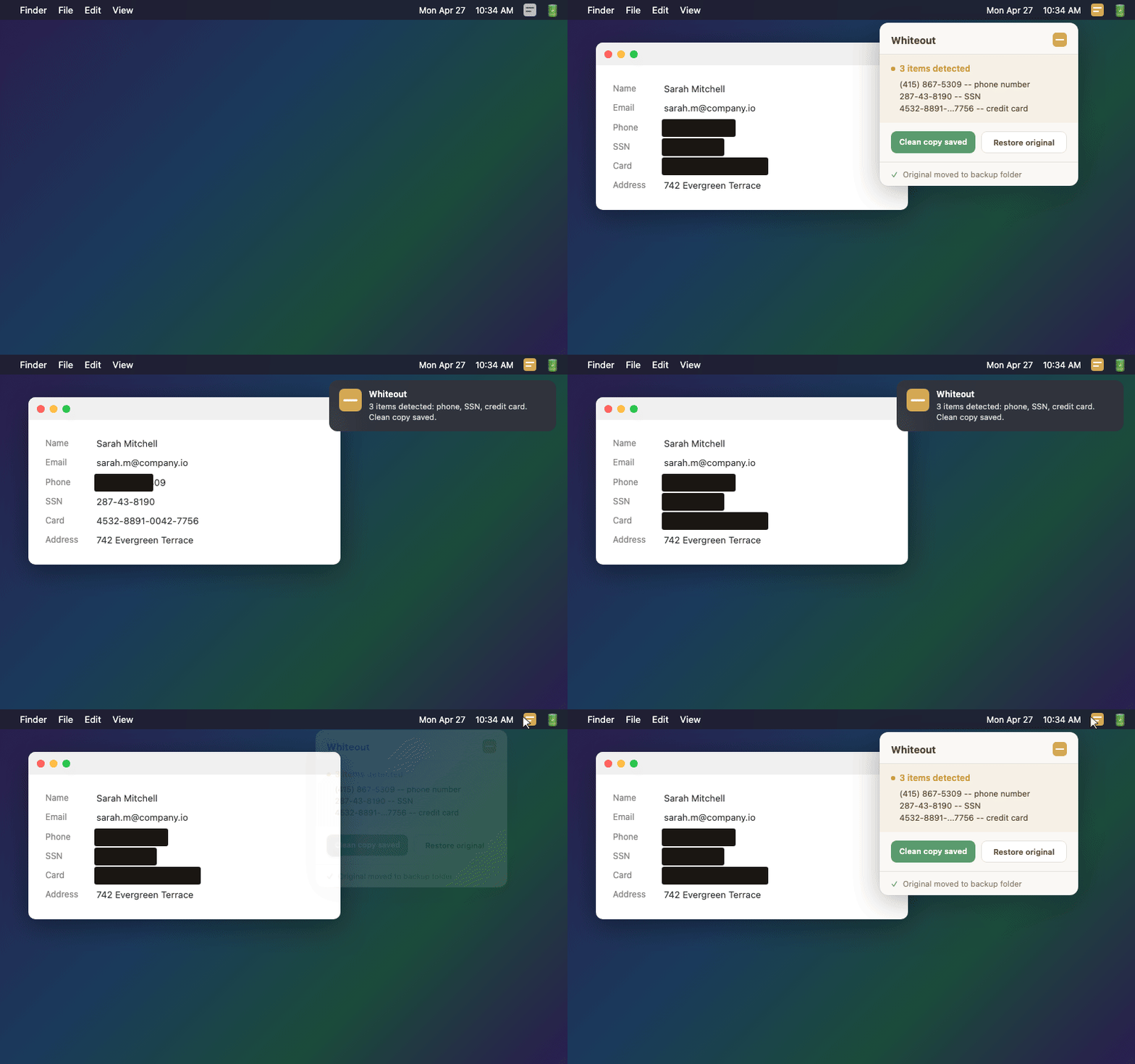
Support teams screenshot customer accounts all day, then forward them to engineering or vendors. Whiteout watches your screenshots folder and redacts the PII the moment a screenshot lands, before the file ever leaves your Mac.
Free for 7 days, then $19 once. No subscription. · Share it with a colleague
How it works
Capture a customer account, a bug report, a ticket thread, however you normally do it. Whiteout watches your screenshots folder quietly in the background.
Whiteout reads the image right on your Mac and checks for personal data. If it finds any, it saves a clean copy the moment the screenshot lands.
The original is tucked safely away. You send the clean version to engineering or a vendor. Nothing private slips out, ever.
The thing you never notice
That customer screenshot you forwarded to engineering has a home address, a credit card, and a private message sitting in plain sight.
That is GDPR processing. Whiteout covers all of it before the file leaves your Mac.
Why Whiteout
Always-on, fully offline, and built to do exactly one thing well. A seatbelt, not another toolbox to learn.
No cloud endpoint to trust, no account, no BAA to negotiate. Whiteout reads your images using built-in macOS features and nothing else. There is no upload path, so a customer's data never becomes someone else's processing.
No capture step, no upload, no button to remember. The moment a screenshot lands in your folder, Whiteout redacts the PII and moves your original to a safe backup. Zendesk redaction skips attachments of any kind. Whiteout does not.
Not a 20-feature toolbox to learn. A 60-second setup, one notification prompt, and a one-time macOS Desktop-access confirmation, then it just runs. 11 kinds of sensitive data out of the box, and you can mark your own details as safe so they are never flagged.
Whiteout finds exactly where the text sits and covers it with crisp black rectangles. No messy blur, no half-visible characters, nothing that can be undone.
Detection
See it work
Pricing
FAQ
No. Everything happens right on your Mac. Nothing gets uploaded, there's no account to create, and no one can see your screenshots but you.
Zendesk redaction works on ticket text, not on attachments of any kind, so anything inside a screenshot stays exposed. Whiteout handles the image side automatically, before the file ever leaves your Mac.
Any Mac running macOS Sonoma (14) or later. That covers most Macs from 2018 onward.
They're always safe. Whiteout saves a clean copy and moves the original into a backup folder. You can restore it any time with one click.
Yes. Turn any detection type on or off in settings, and mark specific values as safe so they're never flagged, like your own email address.
It catches the most common sensitive formats very reliably. You can always review what was found before sharing, and restore the original whenever you need it.
Full refund within 30 days, no questions asked. And the 7-day free trial means you can try everything before you pay a cent.
Not yet. Whiteout is Mac-only today. If you want it on Windows, tell us and we will let you know if it ships.
Notify me about WindowsInstall once. Let it run. Share anything.